Loading app details…
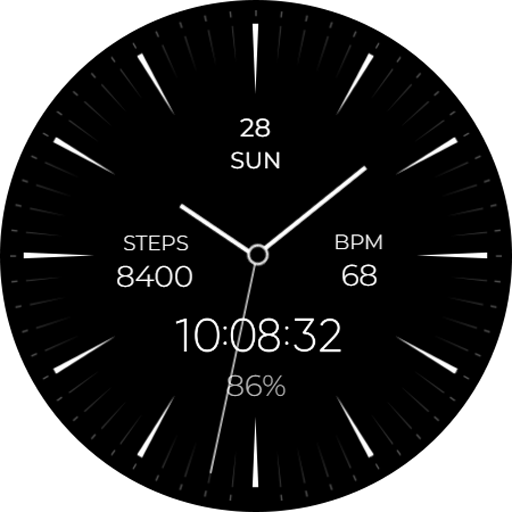
Minimal & Simple Watch - RE
A minimalist Wear OS watch face design, emphasizing simplicity and ease of use. It features a clean, uncluttered display with essential information such as time and date, presented in a sleek and straightforward manner. <br><br> <font color="#00a675">Powered by Watch Face Format</font><br><br>⚙️ <font color="#00a675"> Phone App Features</font><br><br>The phone app is simply a tool to facilitate installation and locating the watch face on your Wear OS watch. Only the mobile app contains ads. <br><br>⚙️ <font color="#00a675"> Watch Face Features</font><br><br>• 12/24h Digital Time<br>• Date<br>• Battery<br>• Heart rate<br>• Steps Count<br>• 2 customizable Complications<br>• Always on Display<br><br>🎨 <font color="#00a675">Customization</font><br><br>1 - Touch and hold display<br>2 - Tap on <b>Customize</b> option<br><br>🎨 <font color="#00a675">Complications</font><br><br><b>Touch and hold</b> display to open customization mode. You can customize the field with any data you want. <br><br>🔋 <font color="#00a675">Battery </font><br><br>For better battery performance of the watch, we recommend disabling the "Always On Display" mode.<br><br>✅ Compatible devices include <font color="#00a675">API level 33+ Google Pixel, Galaxy Watch 4, 5, 6, 7 and other Wear OS models.</font><br><br> <font color="#E97451">Installation and troubleshooting</font><br>Follow this link: https://www.recreative-watch.com/help/#installation-methodes<br><br> <font color="#E97451">Watch faces don't automatically apply on your watch screen after the installation. That's why you must set it on your watch's screen.</font><br><br>💌 Write to support@recreative-watch.com for assistance.
Ad · slot