9 similar Watch Face apps
Best Argos Digital Watch Face Alternatives (2026)
Looking for an app like Argos Digital Watch Face? These are the top-rated watch face alternatives on Android, each scanned with the download on APK Store.

The Moon Watch Face
★ 4.5 · 📱 COMPATIBLE: Samsung Galaxy Watch 8, Ultra, 7, 6, 5 | Google Pixel Watch 4, 3, 2 | All Wear OS 6+ smartwatches<br><br>⌚ The Moon combines the charm of analog hands with a realistic lunar background.<br><br>✨ KEY FEATURES:<br>• Moon Phase Tracking<br>• 📅 Full Calendar<br>• 🔋 Battery Level %<br>• 🚶 Step Counter<br>• Celestial Design<br>• 🌙 AOD Support<br>• ✅ Wear OS Optimized<br><br>🎯 PERFECT FOR:<br>• Fans of modern design<br>• Lovers of classic style<br><br><br>⚠️ Note: The watch face may take up to 15 minutes to appear. Search in Play Store on your watch if needed.

Digital Rapter Watch face
★ 4.7 · Wear OS device only<br><br>Dial Information:<br>- The dial supports automatic switching of the time format 12h/24h<br>- Changeable background colors (tap & hold to customize & change colors)<br>- Steps<br>- Battery<br>- Heart<br>- Date<br>- Aod Mode<br><br>Supported devices:<br>all Wear OS devices with API Level 30+<br><br>Note:<br>- This watch face doesn't support square devices.
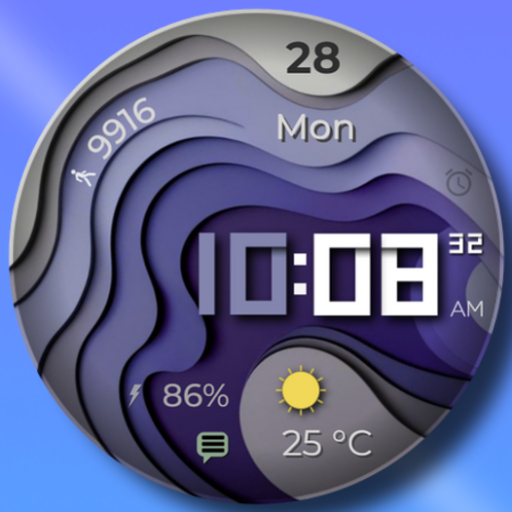
WAVES - Digital Watch Face
★ 4.5 · I'm pleased to present another watch face with many selection of customizable elements.<br>A lot of possible designs combination! You can find your favorite point of view. <br>Customization<br>- 6 types of background<br>- 15 colors for the displayed time<br>- 2 version of AOD<br>- 1 compilation fields<br>- 12/24 time<br><br>NOTE:<br>This app is made for Wear OS devices.

Flora Elegant Design Watchface
★ 4.1 · If you need help with installation please email: nxvwatchface@gmail.com or visit https://nxvwatchface.com/help<br><br>[For Wear OS devices]<br><br>Elegant, stylish and vibrant ladies watch face with the following features:<br><br>• 5 background color customization options (long tap watch face to customize)<br>• 6 text & theme color options (long tap watch face to customize)<br>• 12/24 hour time<br>• Steps counter<br>• Heart rate (10 minute measurement interval or tap on heart rate icon to take manual measurement)<br>• Day & date (multi language)<br>• Battery percentage<br>• Ambient mode
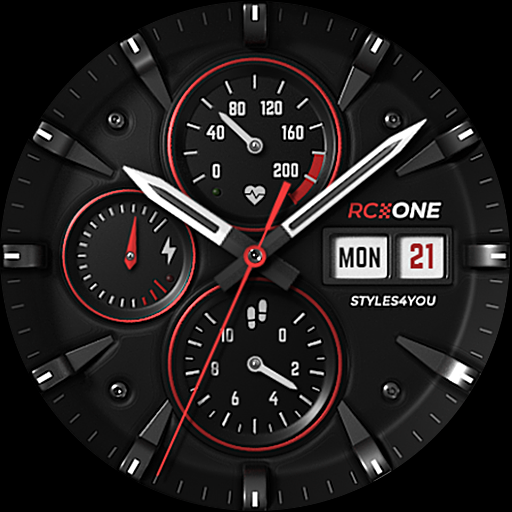
S4U RC ONE - Basic watch face
★ 4.3 · ****<br>⚠️ IMPORTANT: Compatibility<br>This is a Wear OS Watch Face app and supports only smartwatches running Wear OS 5 or higher (Wear OS API 34+).<br>Compatible devices include:<br>- Samsung Galaxy Watch 4, 5, 6, 7, 8 (incl. Ultra and Classic Versions)<br>- Google Pixel Watch 1–4<br>- Other Wear OS 5+ smartwatches<br><br>If you experience any issues with installation or downloading, even on a compatible smartwatch:<br>1. Open the companion app provided with your purchase.<br>2. Follow the steps in the Install/Issues section.<br><br>Still need help? Feel free to email me at wear@s4u-watches.com for support.<br>****<br><br>The "S4U RC ONE - Basic" is a realistic analog dial inspired by classic chronographs. The extraordinary 3D effect makes you feel like you are wearing a real watch. You can set up 7 custom shortcuts to get to your favorite app with just one click. Check out the gallery.<br><br>✨ Key Features:<br>- ultra realistic analog watch face<br>- 7 individual shortcuts (reach your favorite app with just one click)<br>- 3 ring colors on the inner dials<br>- you can change the color of the small hands and the logo between red and white<br><br>***<br><br>🕒 Data Displayed:<br><br>Display in the right area:<br>+ Weekday<br>+ Day of the month<br><br>Display on bottom:<br>+ analog Pedometer (max. 40k steps)<br><br>Display at the left:<br>+ Battery Status 0-100%<br><br>+ Have an minimal always on display.<br><br>***<br><br>🎨 CUSTOMIZATION OPTIONS<br>1. Press and hold the watch display.<br>2. Push the customize button.<br>3. Swipe left or right to switch between the different customizable objects.<br>4. Swipe up or down to change the options/color of the objects.<br><br>Available Customization Options:<br><br>Ring Color: 3 options (red, white or black)<br>Border Shadow: 2 options (off, on)<br>Color: Color combination for the second hand, logo, and small hands (colors are red or white)<br><br>***<br><br>⚙️ COMPLICATIONS & SHORTCUTS<br>Enhance your watch face with customizable app shortcuts:<br><br>App Shortcuts = Link to your favorite widgets for quick access.<br><br>1. Press and hold the watch display.<br>2. Push the customize button.<br>3. Swipe from right to left until you reach the "complications".<br>4. The 7 shortcuts are highlighted. Click on it to set what you want here.<br><br>***<br><br>📬 Stay Connected<br>If you enjoy this design, be sure to check out my other creations! I’m constantly working on new watch faces for Wear OS. Visit my website to explore more:<br>🌐 https://www.s4u-watches.com<br><br>Feedback & Support<br>I’d love to hear your thoughts! Whether it’s something you like, dislike, or a suggestion for future designs, your feedback helps me improve.<br><br>📧 For direct support, email me at: wear@s4u-watches.com<br>💬 Leave a review on the Play Store to share your experience!<br><br>Follow Me on Social Media<br>Stay up to date with my latest designs and updates:<br><br>📸 Instagram: https://www.instagram.com/matze_styles4you/<br>👍 Facebook: https://www.facebook.com/styles4you<br>▶️ YouTube: https://www.youtube.com/c/styles4you-watches<br>🐦 X: https://x.com/MStyles4you
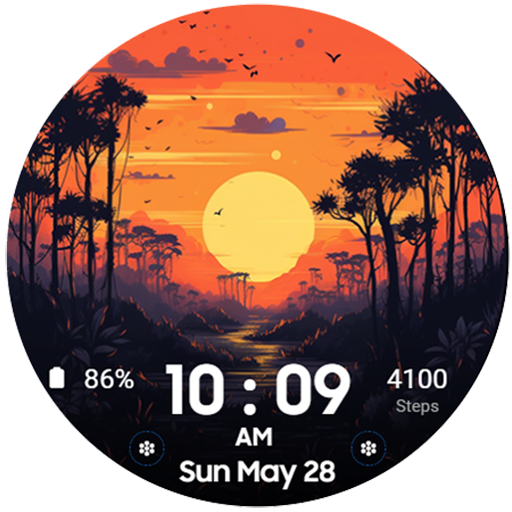
The Sunset Digital Watchface
★ 4.5 · The Sunset - Digital Watchface For Wear OS.<br>Feature :<br>- Digital Clock<br>- Date<br>- 2 Editable Complication<br>- 2 Custom app shortcut<br>- 4 Background Variant<br><br>*** The watch must be worn on the wrist for Health (HR) and Sports data to work<br>*** HR display only shows last update<br>*** Oppo and square watch models are not supported at the moment

[Remastered] GYD003 Digital
★ 4.5 · [압도적인 입체감, 하이테크 디지털의 재탄생 - GYD003 Remastered]<br><br>베스트셀러 GYD003 모델이 기존 디자인 정체성은 유지하면서 더욱 더 고퀄리티의 새로운 모습으로 돌아왔습니다. 더 깊어진 입체감, 극대화된 시인성, 그리고 사용자의 자유도를 높인 4종의 컴플리케이션 추가까지. 당신의 스마트워치를 진정한 하이테크 장비로 업그레이드하세요.<br><br>🕒 디자인 하이라이트<br><br>* 3D 입체 LCD 디스플레이: 디지털 숫자에 깊이감 있는 그림자와 입체 효과를 부여하여, 마치 실제 액정 화면을 보는 듯한 생생한 몰입감을 제공합니다.<br><br>* 다크 프리미엄 커버: 전체적인 배경과 커버 디자인을 다크한 톤으로 전면 교체하여, 어떤 스트랩과도 완벽하게 어우러지는 고급스러운 분위기를 연출합니다.<br><br>* 하이브리드 비주얼: 직관적인 대형 디지털 시간과 정밀한 아날로그 서브 다이얼이 조화를 이루어 미래지향적인 감성을 극대화했습니다.<br><br>⚙️ 주요 기능<br><br>* 극대화된 시인성: 걸음 수(STEPS)와 심박수(HR) 데이터의 폰트 크기를 대폭 키워, 운동 중에도 한눈에 건강 상태를 확인할 수 있습니다.<br><br>* 정보 중심 대시보드: 날짜, 요일 표시기, 배터리 잔량 바 등 필수 정보를 논리적으로 배치했습니다.<br><br>* 4종의 편집 가능 컴플리케이션: 기존의 로고 자리를 대신하여 12시, 3시, 6시, 9시 방향에 사용자가 원하는 정보를 자유롭게 배치할 수 있는 컴플리케이션 기능을 추가했습니다.<br><br>🛠 커스터마이징<br><br>* 8종 LCD 배경 컬러: 클래식한 그린부터 세련된 퍼플까지, 기분에 따라 LCD 배경 색상을 변경할 수 있습니다.<br><br>* 8종 디지털 숫자 컬러: LCD 배경과 별도로 숫자 컬러를 조합하여 수십 가지의 독창적인 스타일을 완성하세요.<br><br>* 다크 커버 테마: 리마스터링된 다크 계열 커버 컬러가 시각적 피로감을 줄여줍니다.<br><br>🌙 AOD (Always On Display) 모드<br><br>GYD003 Remastered는 전력 소모를 최소화하면서도 핵심적인 디자인 요소를 유지하는 세련된 AOD 모드를 지원합니다. 어두운 곳에서도 배터리 걱정 없이 스타일을 유지하세요.<br><br>⌚ 지원 기기<br><br>Wear OS 4.0 이상을 실행하는 모든 기기를 지원합니다. (Samsung Galaxy Watch 4, 5, 6, 7, Ultra, Google Pixel Watch 등)<br>----<br>개발자 연락처 :<br>허근영 목동남로4길 81<br>105동 201호<br>양천구, 서울특별시 08101<br>South Korea 440-54-00782 00 00

TIMEFLIK Watch Faces
★ 3.9 · <b>The best smartwatch watch face marketplace with over 2 million watch faces, the most in the world.</b><br><br>Galaxy Watch 7, 8 Series and All Wear OS 6+ devices Official Support!<br>If you’re using a smartwatch with Wear OS 6, please go to My Page > Settings to switch to the new version.<br><br><b>INSTALL OUR WATCH APP!!! Set TIMEFLIK watch app in your watch screen to send watch faces properly. </b> <br><br>⌚︎ <font color="#45c9c6"><b>Full Watch Face Format Support</b></font><br>Offers customizable features and improved battery-efficient WFF(Watch Face Format) designs.😎<br><br>⌚︎ <font color="#45c9c6"><b>One-Tap Application</b></font><br>Change watch faces instantly with one button, no need for a clunky companion app.<br><br>⌚︎ <font color="#45c9c6"><b>Top Designers</b></font><br>Discover stunning designs by over 50 professional designers.<br><br>⌚︎ <font color="#45c9c6"><b>Design your own watch faces.</b></font><br>Anyone can be a designer with TIMEFLIK free templates!<br>Customize with your photos or free templates like hands, subdials, battery status, even health features; steps, weather and UV index!<br><br>⌚︎ <font color="#45c9c6"><b>Fresh Styles Daily</b></font><br>Upgrade with a subscription for unlimited access to all watch faces. <br>Enjoy your first year's subscription for just $19.99 (a $71.99 value)<br><br><b>Google Play's Best for Wear Winner 👏</b><br><br>[How to use?]<br><br>1. Install our watch app.<br>- Google Play : Wear OS by Google / Samsung Galaxy Watch 4, 5, 6, 7, Ultra, 8, 8 Classic<br>2. Set TIMEFLIK as your watch face.<br>- Go to the Wearable app > Watch faces > and choose Timeflix from the "Downloaded" list.<br><br>[Health Connect Permission Request]<br><br>TIMEFLIK requests Health Connect permission from your mobile device to offer these features:<br><br>1. Check your step count directly on your watch face. Real-time activity tracking helps you monitor your health and stay motivated.<br>2. Enjoy dynamic design updates (e.g., color changes or animations based on your step count) using step data.<br><br>TIMEFLIK uses Health Connect data only for watch face information and does not use it for ads, data sales, or syncing with incompatible platforms. Access is limited to read-only StepsCadence/Steps, and you can manage or delete permissions in the app settings.<br><br><br><b><br>NOT Supported :</b><br>Huawei OS (Huawei Watch GT/GT2)<br>Xiaomi OS (Amazfit GTS / Pace / Bip / ... )<br>FitBit<br>Garmin<br><br><b><br>SUPPORTED:<br>Wear OS by Google</b><br><li> Samsung Galaxy Watch8 / Watch8 Classic<br></li><li> Samsung Galaxy Watch7 / Watch7 Ultra<br></li><li> Samsung Galaxy Watch6 / Watch6 Classic<br></li><li> Samsung Galaxy Watch5 / Watch5 Pro<br></li><li> Samsung Galaxy Watch4/Watch4 Classic<br></li><li> Asus Gen Watch 1, 2, 3<br></li><li> CASIO Series<br></li><li> Fossil Q Series<br></li><li> Guess Wear<br></li><li> Huawei Watch 2 Classic/Sport<br></li><li> Huawei Watch<br></li><li> Hublot Big Bang e<br></li><li> Mobvoi Ticwatch Series<br></li><li> Moto 360 Series<br></li><li> New Balance Run IQ<br></li><li> Oppo Watch<br></li><li> Polar M600<br></li><li> SUUNTO 7<br></li><li> Verizon Wireless Wear24<br><br>[Available in Apple watch? / What about Wear OS Watches not in the list?]<br>TIMEFLIK Android app has to be synced with TIMEFLIK Wear OS/Tizen watch app. So if you don’t have both Android phone + Wear OS/Tizen smart wearable, please understand its feature will be limited.<br><br>[Access Permission Request(Optional)]<br></li><li> Location: To show weather information precisely based on a location.<br></li><li> Health Connect: Permission to use StepsCadence/Steps is required to display step counts from the mobile device on the watch face.<br></li><li> Storage: To send watch faces or read and write files in smartphones and SD cards.</li><br><br>[Disclaimer]<br><li> This app is unavailable on the smartwatch below Wear OS 2.0.<br></li><li> Mobile app installation is necessary for smartwatches powered by Wear OS 2.0. or higher.<br></li><li> Some functions of the smartwatch app require interaction with the mobile app.<br></li><li> When logging in to the smartwatch app, check the passcode on the mobile and enter it.</li>
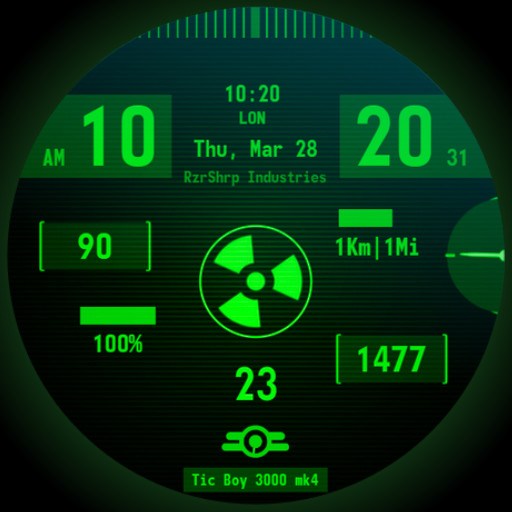
Atomic Tic Watch Face
★ 4.6 · A <font color="green">vintage wrist computer</font> watch face, full of information and highly customizable! Inspired to an old cartoon style and more, depending on the chosen customization.<br><br><font color="red"><h1>Introduction</h1></font><br>This is a native, <b>standalone Wear OS watch face</b>. This means that it can be installed on many smartwatches running this OS (like Samsung, Mobvoi Ticwatch, Fossil, Oppo, the latest Xiaomi and more). <br>It is completely handcrafted, to be unique. <br><br><font color="orange"><h1>Features</h1></font><br>The watch face includes:<br>◉ 30 <b>color</b> schemes<br>◉ Many different <b>customizations</b><br>◉ 12/24 hours format support<br>◉ A lot of information at a glance <br>◉ Customizable UI<br>◉ Walking animated avatar, different animations depending on the battery level<br>◉ 6 customizable complications, of different sizes!<br>◉ Easy to use (and uninstallable) companion app<br><br><font color="green"><h1>Installation</h1></font><br>The installation is straightforward, don't worry!<br>Here's the procedure and a quick Q&A:<br>◉ Install this app in your smartphone<br>◉ Open it, and connect your Wear OS smartwatch to your device<br>◉ If the watch is connected, you will be able to tap the "view and install on smartwatch" button. (if not, refer to the Q&A below)<br>◉ Check your watch, you should see my watch face and the install button (if you see the price instead, refer to the Q&A below)<br>◉ Install it in your smartwatch<br>◉ Long press on your current watch face<br>◉ Swipe left until you see a "+" button, tap on it<br>◉ Look for the new watch face, tap on it<br>◉ Done. If you want, you can uninstall the companion app now!<br><br><b>Q&A</b><br><b>Q</b> - I'm being charged twice! / The watch is asking me to pay again / you're a [derogatory adjective] <br><b>A</b> - Keep calm. This happens when the account you’re using on the smartphone is different from the account used on the smartwatch. You have to use the same account (else, Google has no way to know that you already bought the watch face).<br><b>Q</b> - I can't press the button in the companion app but my smartwatch is connected, why?<br><b>A</b> - Most probably, you're using an incompatible device, like an old Samsung smartwatch or any other non-Wear OS smartwatch/smartband. You can easily check on Google if your device runs Wear OS before installling any watch face. If you're sure you have a Wear OS device and still you can't press the button, open the Play Store on your watch and search for my watch face manually!<br><b>Q</b> - I have a Wear OS device, but it's not working! I'm gonna leave a one star review 😏<br><b>A</b> - Stop right there! Most definitely there's an issue on your side while following the procedure, so please just send me an email (i usually reply during the weekends) and don't damage me with a bad and misleading review!<br><b>Q</b> - The [name of a feature] is not working!<br><b>A</b> - Try setting another watch face and then set mine again, or try allowing the permissions manually (on the watch obviously). If it still doesn't work, there's an handy "email button" in the companion app!<br><br><font color="green"><h1>Support</h1></font><br>If you need help or you have a <b>suggestion</b>, feel free to send me an email, I'll do my best to help. <br>I usually reply during the weekend because I'm just one person (not a company) and I have a job, so be patient!<br>This app is <b>supported and updated</b> to fix bugs and add new features. The overall design won't change, but it will surely be improved over time!<br>I know that the price isn't the lowest, but I worked <b>a lot of hours</b> on each watch face and the price also includes the support and the updates, if you think about it. And i assure you, I'll invest any earning on useful things and to help my family. Oh, and <b>thanks</b> for reading the full description! Nobody does it!