Loading app details…
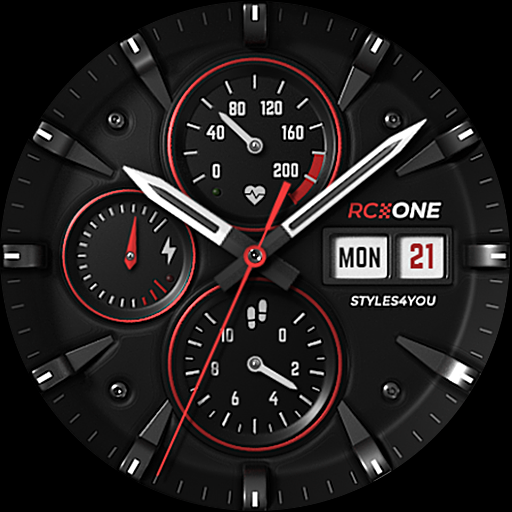
S4U RC ONE - Basic watch face
****<br>⚠️ IMPORTANT: Compatibility<br>This is a Wear OS Watch Face app and supports only smartwatches running Wear OS 5 or higher (Wear OS API 34+).<br>Compatible devices include:<br>- Samsung Galaxy Watch 4, 5, 6, 7, 8 (incl. Ultra and Classic Versions)<br>- Google Pixel Watch 1–4<br>- Other Wear OS 5+ smartwatches<br><br>If you experience any issues with installation or downloading, even on a compatible smartwatch:<br>1. Open the companion app provided with your purchase.<br>2. Follow the steps in the Install/Issues section.<br><br>Still need help? Feel free to email me at wear@s4u-watches.com for support.<br>****<br><br>The "S4U RC ONE - Basic" is a realistic analog dial inspired by classic chronographs. The extraordinary 3D effect makes you feel like you are wearing a real watch. You can set up 7 custom shortcuts to get to your favorite app with just one click. Check out the gallery.<br><br>✨ Key Features:<br>- ultra realistic analog watch face<br>- 7 individual shortcuts (reach your favorite app with just one click)<br>- 3 ring colors on the inner dials<br>- you can change the color of the small hands and the logo between red and white<br><br>***<br><br>🕒 Data Displayed:<br><br>Display in the right area:<br>+ Weekday<br>+ Day of the month<br><br>Display on bottom:<br>+ analog Pedometer (max. 40k steps)<br><br>Display at the left:<br>+ Battery Status 0-100%<br><br>+ Have an minimal always on display.<br><br>***<br><br>🎨 CUSTOMIZATION OPTIONS<br>1. Press and hold the watch display.<br>2. Push the customize button.<br>3. Swipe left or right to switch between the different customizable objects.<br>4. Swipe up or down to change the options/color of the objects.<br><br>Available Customization Options:<br><br>Ring Color: 3 options (red, white or black)<br>Border Shadow: 2 options (off, on)<br>Color: Color combination for the second hand, logo, and small hands (colors are red or white)<br><br>***<br><br>⚙️ COMPLICATIONS & SHORTCUTS<br>Enhance your watch face with customizable app shortcuts:<br><br>App Shortcuts = Link to your favorite widgets for quick access.<br><br>1. Press and hold the watch display.<br>2. Push the customize button.<br>3. Swipe from right to left until you reach the "complications".<br>4. The 7 shortcuts are highlighted. Click on it to set what you want here.<br><br>***<br><br>📬 Stay Connected<br>If you enjoy this design, be sure to check out my other creations! I’m constantly working on new watch faces for Wear OS. Visit my website to explore more:<br>🌐 https://www.s4u-watches.com<br><br>Feedback & Support<br>I’d love to hear your thoughts! Whether it’s something you like, dislike, or a suggestion for future designs, your feedback helps me improve.<br><br>📧 For direct support, email me at: wear@s4u-watches.com<br>💬 Leave a review on the Play Store to share your experience!<br><br>Follow Me on Social Media<br>Stay up to date with my latest designs and updates:<br><br>📸 Instagram: https://www.instagram.com/matze_styles4you/<br>👍 Facebook: https://www.facebook.com/styles4you<br>▶️ YouTube: https://www.youtube.com/c/styles4you-watches<br>🐦 X: https://x.com/MStyles4you