Loading app details…
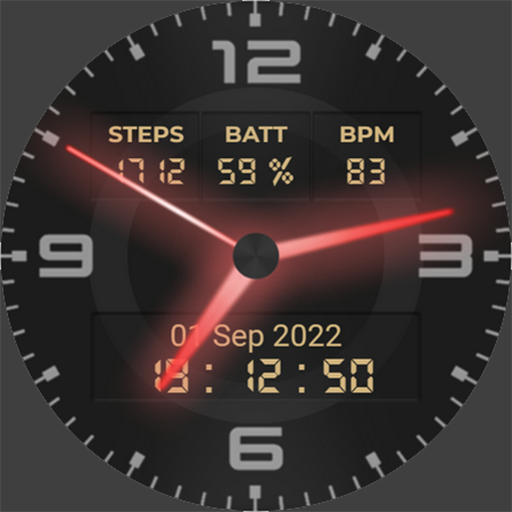
Neon Watchface AKM Wear OS
Hey❗This is Neon Watchface designed for all watches powered by <b>Wear OS</b>.<br><br>❗2 complications slots are available now ❗slots are empty by default, please customize first ❗<br><br>❗<b>IMPORTANT NOTICE:</b><br>❗Please carefully read these instructions before and after downloading our watch face to avoid any unexpected issues.<br><br>Compatibility:<br>This watch face has been extensively tested on the Samsung Watch 4 Classic and Samsung Watch 5 Pro. <br>However, please note that some features may vary slightly on different watch models.<br><br>⭐Installation instructions⭐<br><b>METHOD 1: COMPANION APPLICATION, PREFFERED WAY</b><br>🔹Open the Companion application on your phone (comes with the watchface).<br>🔹Locate the "Get from Watch" option and tap on it.<br>🔹Check your smartwatch for the watch face.<br>🔹Once the watch face appears on your smartwatch, tap the "INSTALL" button.<br>🔹Wait a few minutes for the watch face to be transferred to your smartwatch.<br>🔹Long press on the watch face, swipe left, and tap "ADD WATCH FACE" to activate it.<br><br><b>METHOD 2: PLAY STORE APPLICATION</b><br>❗THIS METHOD IS NOT ALWAYS SUPPORTED BY PLAY STORE❗<br>🔹Open the Google Play Store app on your phone.<br>🔹Tap the triangle icon and select the target device from the drop-down menu.<br>🔹Tap the "INSTALL" button on your phone and wait for the installation to complete on your watch.<br>🔹Long press on the watch face, swipe left, tap "ADD WATCH FACE" and select the watch face to activate it.<br><br><b>METHOD 3: PLAY STORE WEBSITE</b><br>🔹Access the watch face link using a web browser on your PC.<br>🔹Click on "Install on more devices" and select your watch from the target device list.<br>🔹Wait for the watch face to be transferred to your watch.<br>🔹Long press on the watch face, swipe left, tap "ADD WATCH FACE" and select the watch face to activate it.<br><br><b>REFFERING TO THE INSTALLATION GUIDE</b><br>🔹For a detailed and comprehensive installation guide, please visit this link:<br>https://developer.samsung.com/sdp/blog/en-us/2022/11/15/install-watch-faces-for-galaxy-watch5-and-one-ui-watch-45<br><br>❗<b>AVOIDING DUPLICATE PAYMENTS</b><br>Please note that you will only be charged once for the watch face, even if you are prompted to pay again. <br>If you encounter a payment loop, try disconnecting and reconnecting your watch from your phone. <br>Alternatively, enable airplane mode on your watch and reactivate it after a few minutes.<br><br>Once you have installed the watchface, you may be asked to grant permissions to the sensors - be sure to approve all permissions.<br><br>❗ Please consider that any issues here are NOT developer dependent. The developer has no control over the Play Store from this side. Thank you. ❗<br><br>⭐What is inside⭐<br>✔ 6 different hand colors (TAP and hold on the watchface, then set Customize);<br>✔ All languages are supported for Month indication (based on language phone settings);<br>✔ 12/24 time format;<br>✔ Tap zones: Alarm, Calendar and Heart rate measurement;<br>✔ AOD mode;<br><br>❗ Dear customer<br>If you have any problems, please contact me first via e-mail <b>akchimwf@gmail.com</b> <br>Then I gladly will help you asap❗
Ad · slot