Loading app details…
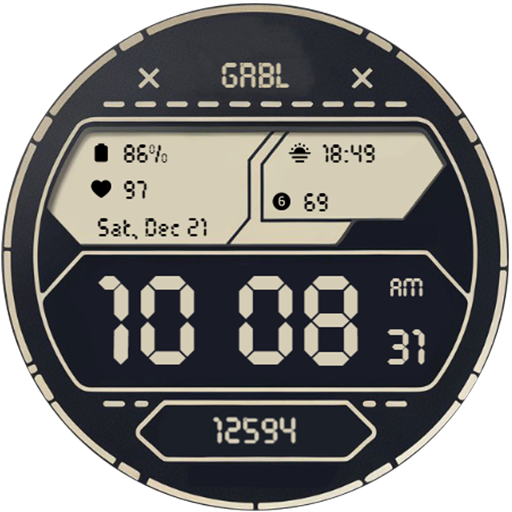
GRBL Digital Two Watch Face
<big>Features:</big><br>Designed for Wear OS<br><br>1. Supports AM/PM and 12H/24H format<br>2. 5 changeable complications <br>3. 11 themes<br>4. Date (format change base on user's locale)<br>5. Theme-colored AOD<br>6. Blinking colon<br><br>If you face any problem, please reach out to us at grubel.watchfaces@gmail.com. We’ll gladly provide screenshots and step-by-step instructions to help you install the watch face.<br>Watch faces do not change automatically after installation. To set it up, return to the home display, tap and hold, swipe to the end, and tap ‘+’ to add the watch face. Use the bezel to find it.<br><br>Samsung Developers offer a helpful video showing multiple ways to install a Wear OS watch face:<br><br>https://youtu.be/vMM4Q2-rqoM<br><br>PLEASE KEEP IN MIND THAT THE COMPANION APP DOESN'T INSTALL WATCHFACE ON THE WATCH. PLEASE READ INSTRUCTIONS BELOW.<br><br>There are two ways to install this watchaface to your WearOS device:<br><br>From PLAY STORE APP:<br>1. Use the drop-down menu and select the target<br>device on the PLAY STORE APP:<br>after a few minutes the watch face will transferred on<br>watch.<br>2- ACTIVATE WATCH FACE:<br>Once installed, you need to activate the watch face.<br>Long press screen, swipe left and tap "ADD WATCH<br>FACE" to activate it.<br><br>From PLAY STORE WEBSITE:<br>1 - Go to the watch face link through a Web Browser on<br>PC / Mac such as Chrome, Safari (etc.). You can search<br>the watch face name on Play Store.<br>Click on "Install on more devices" and select the target<br>device:<br>after a few minutes the watch face will transferred on<br>watch.<br>2- ACTIVATE WATCH FACE:<br>Once installed, you need to activate the watch face.<br>Long press screen, swipe left and tap "ADD WATCH<br>FACE" to activate it.<br><br><br>Before drop a negative feedback (1 star) on Play Store please read the guide carefully or contact me:<br>grubel.watchfaces@gmail.com<br><br><br><br><br><big>Disclaimer: </big><br>Each device offers different custom complications, and selection varies by third-party apps. Custom complications shown in store screenshots come from third-party app - Phone Battery Complication<br><br>Please keep in mind that any issues on this side are<br>not caused by the developer/watchface. I have no<br>control over Google's issues.<br>Before drop a negative feedback (1 star) on Play Store<br>for these reasons, please read the guide carefully or<br>contact me:<br>grubel.watchfaces@gmail.com