Loading app details…
Master Watch Face
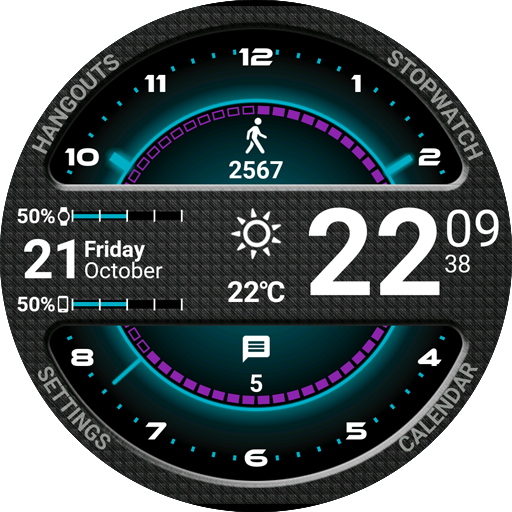
Master Watch Face for Wear OS!<br><br><u><b>★ Features of Master Watch Face ★</b></u><br><br>- Choose design colors<br>- Day & Month<br>- Watch battery<br>- Mobile battery (requires phone app)<br>- Weather (requires phone app)<br><br><br>The settings of the watch face are located in the "Wear OS" app of your mobile.<br>Just hit the gear icon over the watch face preview and the settings screen will show up!<br><br><br><u><b>★ FREE Settings ★</b></u><br><br><u>🔸Wear OS 2.X / 3.X / 4.X</u><br>- Choose design colors on watch & mobile<br>- Define heartbeat frequency refresh rate<br>- Define weather refresh rate<br>- Weather unit<br>- 12 / 24 hours mode<br>- Define interactive mode duration<br>- Choose the ambient mode b&w and eco luminosity<br>- Choose to display a leading zero on hours<br>- Choose to display or not the seconds dots<br><br><u>🔸Wear OS 6.X</u><br>- Choose design colors<br>- Choose to display or not the seconds dots<br>- Display shortcuts or not<br>- Display watch / mobile battery indicators or not<br>- ... and more<br><br><br><u><b>★ PREMIUM Settings ★</b></u><br><br><u>🔸Wear OS 2.X / 3.X / 4.X</u><br>- Switch between éco / simple b&w / full ambient mode<br>- Choose background among different styles<br>- Blend background with colors<br>- Define a secondary timezone for digital display<br>- Data:<br> + Change the indicator to display on the 3 positions<br> + Choose between up to 8 indicators (Daily step count, Heartbeat frequency, Unread Email from Gmail, etc...)<br> + Complication (wear 2.0 & 3.0)<br>- Interactivity<br> + Access to detailed data by touching a widget<br> + Switch the displayed data by touching a widget<br> + Change the shortcut to execute on the 4 positions<br> + Choose your shortcut among all applications installed on your watch!<br> + Choose to display the interactive areas<br> <br><u>🔸Wear OS 6.X</u><br>- Choose background among different styles<br>- Blend background with colors<br>- Complication data:<br> + Set the data you want on the widgets<br> + Touch the widgets to start the data activity if available<br>- Interactivity<br> + Access to detailed data by touching a widget<br> + Modify the shortcuts: choose your shortcut among all applications installed on your watch!<br><br><br><u><b>★ Additional features on phone ★</b></u><br><br>- Notifications for new designs<br>- Access to support<br>- ... and more<br><br><br><u><b>★ Installation ★</b></u><br><br><u>🔸Wear OS 2.X / 3.X / 4.X</u><br>A notification will be displayed on your watch, right after your mobile installation. You just have to hit it to start the installation process of the watch face.<br>If the notification did not display for some reason, you can still install the watch face by using the Google Play Store available on your watch: just search the watch face by its name.<br><br><u>🔸Wear OS 6.X</u><br>Install the watch app to manage the watchface: the free version is automatically installed. Then use the "MANAGE" button in the top right shortcut of the watchface to update/upgrade your watch face.<br><br><br><u><b>★ More watch faces</b><br><br>Visit my watch faces collection for Wear OS on the Play Store at https://goo.gl/CRzXbS<br><br><br>** If you have any issues or questions, feel free to contact me by email (English or French language) before giving a bad rating. Thanks!<br><br><br>Website: https://www.themaapps.com/<br>Youtube: https://youtube.com/ThomasHemetri<br>Twitter: https://x.com/ThomasHemetri<br>Instagram: https://www.instagram.com/thema_watchfaces</u>